Welcome to AnimLib Doc
AnimLib provides an alternative approach to using Blender's NLA Editor, focusing on improving the efficiency of managing and exporting game animation clips, allowing you to:
- Quickly organize and manage large numbers of NLA strips
- Batch export selected strips as animation files
Supported Blender Version
Blender 5.0 or later
Core Features
NLA Strip Organization Tools
AnimLib provides comprehensive strip management features, enabling you to efficiently organize animation data:
Selection Tools
- Quickly select all tracks in a specified direction
- Quickly select strips to the left or right of the Current Frame
- Search and quickly locate specific strips by name
- Support for precise selection within selected track ranges
Arrangement Tools
- Adjust track order
- Arrange multiple strips with user-specified intervals
- Batch insert selected strips after a specified strip, with configurable spacing and insertion order
- Batch move selected strips to a specified track, with configurable spacing and movement order
Maintenance Tools
- Check for empty strips and detect multiple strips sharing the same action
- Simultaneously rename a strip and its corresponding action
- Batch sync selected strip names to match their action names
- Batch sync selected strip lengths to match their actual action lengths
- Remove all empty tracks to keep projects tidy
Batch Animation Export
AnimLib makes animation export simple and flexible:
Flexible Export Options
- Select which strips to export, and export them as individual files or merge them into a single file.
- Support for FBX and glTF 2.0 formats.
Who Should Use This?
AnimLib is suitable for:
- Game developers who need to quickly switch between and batch export specified NLA strips
- Creators who want to use Blender NLA as an animation library
Limitations
Blender NLA's original design allows users to combine different animation clips into a single animation through blending and layering. This conflicts with how AnimLib uses NLA. AnimLib is designed to use NLA as an animation library, so strip properties related to blending and layering cannot be used, in order to avoid unexpected issues. If you need to layer animations, it's recommended to process them in a separate Blender file, bake the result, and then add it to the sequence.
The following properties cannot be used:
- Extrapolation
- Blending
- Blend In/Out
- Auto Blend In/Out
- Reversed
- Cyclic Strip Time
- Animated Influence
- Animated Strip Time
- Influence
- Strip Time
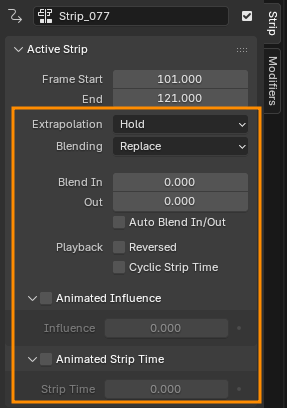
If you have previously modified any of the above properties, you can use the Reset All Strip Properties feature in AnimLib's NLA Tools to reset all strip properties.
Warning! This will completely reset the above strip property settings. If you're unsure, it's recommended to back up your Blender file first.
Getting Started
Please refer to Installation to learn how to install the addon, or go directly to NLA Tools and Exporter for detailed feature descriptions.